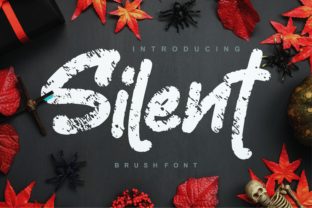
Silent
When you see Silent, you feel it before you read it — a confident, unpolished energy that lands somewhere between coffee-shop chalkboard and late-night sketchbook. It’s not just another handwritten font. Silent is a bold, cool, handwritten typeface built for clarity without stiffness, personality without pretense. Its casual vibe makes it ideal for branding that wants to stand out while staying grounded — think indie product labels, social media graphics, podcast covers, or workshop handouts. But because Silent looks so effortless, many users assume it’s plug-and-play — and that’s where things go quietly off track.
Assuming “handwritten” means “universal”
Handwritten fonts like Silent are often chosen for their warmth and approachability — but they’re rarely neutral. Silent has strong contrast, tight spacing in uppercase, and generous x-heights that give it presence at medium sizes. That’s great for headlines, but problematic for long paragraphs or small UI text. One freelance designer used Silent for an entire e-commerce product description page — only to realize during user testing that readability dropped significantly below 16px. The font wasn’t broken; it was mismatched.
Before using Silent for body copy, ask: Is legibility my priority here — or tone? If the answer is both, pair Silent with a clean, highly legible sans-serif (like Inter or Open Sans) for supporting text. Reserve Silent for what it does best: grabbing attention, reinforcing voice, and adding human texture.
Overlooking licensing — especially for commercial use
Silent is available through multiple sources — some free for personal use, others requiring a license for business applications. A small bakery owner downloaded a “free Silent” file from an unofficial site, used it on packaging and Instagram ads, then received a polite but firm notice from the foundry. No lawsuit — but a $99 retroactive license fee and redesign time she hadn’t budgeted for.
Always verify the source. Official releases of Silent come with clear licensing terms — usually covering web, desktop, app, and logo use under one commercial license. Free versions may lack OpenType features (like stylistic alternates or ligatures), be missing weights, or restrict usage to non-commercial projects. Check the license *before* finalizing mockups — not after printing or launching.
Ignoring how weight and size interact
Silent comes in one weight — bold — which is part of its charm. But that also means there’s no lighter version to fall back on for hierarchy. Some users try to fake variation by reducing opacity or applying CSS font-weight: 300 — neither works. Silent doesn’t support those adjustments. What results is either muddy text (if opacity is too low) or misleading styling (if browsers ignore the unsupported weight).
Better approach: Use scale and spacing instead. Try Silent at 48px for a hero headline, then switch to a crisp sans-serif at 24px for subheads, and 18px for body. Or use Silent consistently across all headlines and rely on color, background, or line height to signal importance. Consistency beats forced variation every time.
Misjudging color contrast and accessibility
Silent’s thick strokes and tight letterfit look striking on dark backgrounds — but can become illegible on light grays or pastels. A blogger used Silent in #E0E0E0 on a white background for a newsletter banner. Analytics showed a 40% drop in scroll depth on that page. When tested with WCAG contrast checkers, the ratio was 2.8:1 — far below the 4.5:1 minimum for normal text.
Fix it simply: Stick to high-contrast pairings. Black Silent on white, white Silent on deep navy, or charcoal Silent on cream (if tested). If you need softer tones, increase font size or add subtle stroke effects — but always validate with a real contrast checker, not just your eyes.
Skipping the test in real contexts
It’s tempting to judge Silent solely in a design tool — but fonts behave differently across devices, browsers, and rendering engines. A marketer used Silent in a Canva social post, loved how it looked on her Mac, then noticed jagged edges and uneven spacing when viewed on Android Chrome. The issue? Canva rendered the font as a rasterized image, losing hinting and OpenType refinements built into the original .woff2 file.
Test where it lives: Embed Silent properly via @font-face if using on websites. For print, export as vector (PDF/EPS) — never screen-captured PNGs. For presentations, embed fonts in PowerPoint or Keynote rather than relying on system fallbacks. And always preview on at least two devices — one iOS, one Android — before final approval.
Underestimating pairing discipline
Silent’s personality is strong — so much so that pairing it with another expressive font (say, a script or distressed display face) often creates visual noise. A startup founder combined Silent with a flowing brush script for their brand guidelines, thinking “more personality = more memorable.” Instead, stakeholders described the combination as “busy,” “unfocused,” and “hard to scan.”
Let Silent lead — then choose a quiet partner. A geometric sans-serif (like Poppins or Manrope), a neutral slab (like Roboto Slab), or even a well-set serif (like Lora) provides structure without competing. Limit yourself to two type families total. If Silent is your accent, treat it like a signature ingredient — bold, intentional, and never overused.
What to check before downloading or buying
- Source authenticity: Is it from the official foundry or an authorized reseller? Look for verified badges, clear contact info, and updated documentation.
- File formats included: Does it offer WOFF2 (for web), OTF/TTF (for design apps), and variable options if needed?
- Language support: Silent covers Latin-based languages well — but double-check if you need extended diacritics, Cyrillic, or Greek.
- OpenType features: Does it include discretionary ligatures, swashes, or alternate characters? These aren’t essential — but they add polish for logos or short quotes.
- Support & updates: Reputable sellers offer email support and occasional updates — useful if you’re building long-term brand assets.
Silent isn’t just a font — it’s a tone-setter. Used thoughtfully, it adds authenticity and energy without shouting. Used carelessly, it can undermine clarity, accessibility, or professionalism. The difference isn’t in the letters themselves — it’s in how intentionally you apply them. Start small: pick one use case (a logo lockup, a social banner, a workshop slide), test it across contexts, refine the pairing, and scale only once it feels resolved. That’s how Silent earns its place — not as decoration, but as deliberate voice.