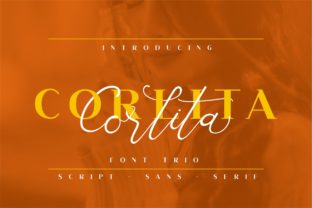
Corlita Trio: A Thoughtful Choice for Elegant, Cohesive Typography
Corlita Trio is more than a collection of three fonts—it’s a carefully calibrated typographic system designed to work in harmony. It includes a refined sans serif, a graceful serif, and an expressive script—each crafted with consistent proportions, rhythm, and character weight. That intentional balance makes Corlita Trio especially valuable for creators who need visual unity across multiple touchpoints: from wedding stationery and boutique packaging to brand identities and digital interfaces.
Why People Reach for Corlita Trio—and What They Often Overlook
Many designers and small business owners choose Corlita Trio because it promises elegance without complexity. The appeal is real: one purchase gives you three complementary styles that *should* pair effortlessly. But here’s where assumptions can quietly undermine results—especially for beginners or time-pressed entrepreneurs.
A common misstep is treating the trio as interchangeable “styles” rather than a coordinated system. For example, using the script for body text on a website or the serif for mobile app buttons may look beautiful in isolation—but it often sacrifices readability, loading performance, or accessibility. The script version, while stunning for headlines or monograms, isn’t built for long paragraphs or small screens. Similarly, the sans serif shines in UI and signage, but swapping it in for formal invitations without adjusting spacing or hierarchy can flatten the intended warmth.
Mistake #1: Assuming All Three Fonts Are Equally Suitable for Every Medium
Each font in Corlita Trio has distinct technical and aesthetic strengths. The sans serif is optimized for clarity at small sizes and fast rendering online. The serif carries traditional authority and works beautifully in print—especially on high-resolution paper. The script, meanwhile, relies on OpenType features like ligatures and contextual alternates to feel natural, and those features don’t always activate automatically in every application (like basic email builders or older CMS editors).
Better approach: Map each font to its ideal role before designing. Try this simple test: if you’re building a Shopify product page, use the sans for headings and specs, the serif for descriptive copy, and reserve the script for the brand tagline—only where it appears large, centered, and unbroken by line wraps. If you’re designing wedding invites, lead with the script for names, support with the serif for details, and use the sans only for practical notes (RSVP deadlines, dress code) in smaller point sizes.
Mistake #2: Skipping the Licensing Check—Especially for Digital or Commercial Use
Corlita Trio is typically sold with clear licensing tiers: personal, standard (for small businesses), and extended (for templates, SaaS platforms, or merchandise). Yet many users download a trial, test it in a mockup, then assume the same license covers their live e-commerce site—or worse, embed it directly into a WordPress theme they plan to resell.
This isn’t just a legal risk—it affects functionality. Free trials often lack webfont files (WOFF2, EOT) or variable axes needed for responsive typography. And without proper web licensing, self-hosting the font may violate terms, leading to takedowns or unexpected costs later.
Better approach: Before purchasing, ask yourself: Will this appear on a public website? In client deliverables I’ll hand off? On physical products I’m selling? Then match your answer to the appropriate license—not the cheapest one. Most reputable vendors list usage examples right on the product page. When in doubt, email the foundry. A quick reply today prevents redesigns or fees down the road.
Mistake #3: Ignoring Kerning, Tracking, and Vertical Rhythm in Real Layouts
Corlita Trio’s beauty emerges in subtlety—the gentle curve of a lowercase g, the even air between letters in all-caps headlines, the way the script’s ascenders align with the serif’s x-height. But those details only shine when given room to breathe. Crowding the script between tight margins, setting the serif at 14px with no line-height adjustment, or applying default auto-kerning in Canva instead of manual pair adjustments all mute its intention.
Real-world example: A café owner used Corlita Trio’s script for their menu board headline but kept the default tracking. The letters felt cramped and slightly aggressive—undermining the relaxed, artisanal vibe they wanted. After loosening tracking by +50 and increasing line height by 1.6x on the supporting serif copy, the entire layout softened and gained sophistication.
What to Verify Before You Commit
- File formats included: Does the package offer OTF, WOFF2, and variable font options (if applicable)? Not all versions support advanced features like optical sizing or grade shifts.
- Language support: Corlita Trio covers Latin-based languages well—but check if your project needs Central/Eastern European diacritics, Vietnamese tone marks, or extended punctuation. Some releases include them; others require add-ons.
- Customer support & updates: Reputable sellers provide prompt help for technical issues (e.g., “Why won’t the script ligatures activate in Illustrator?”) and free updates if the family expands.
- Preview accuracy: Always test the fonts in your actual workflow—not just the vendor’s web demo. Paste sample text into your design tool, export a PDF, and view it on both desktop and mobile.
Using Corlita Trio Well Is About Intention, Not Just Aesthetics
You don’t need advanced typography training to benefit from Corlita Trio—but you do benefit from pausing before defaulting to “what looks pretty.” Ask: What’s the message? Who’s reading it—and where? What action should follow? A luxury skincare brand using the script for its logo but the sans for ingredient lists builds trust through contrast and clarity. A teacher creating classroom posters might lean on the serif for quotes and the sans for instructions—keeping focus where it matters most.
Corlita Trio rewards thoughtful application. It doesn’t force decisions—it invites them. When you align its strengths with your real-world constraints (technical, budgetary, audience-related), it becomes more than a font purchase. It becomes a quiet partner in communication—one that helps your work feel considered, cohesive, and unmistakably yours.