Holland Dingbats: Doodles That Type Like Letters—And Why That Changes How You Design, Teach, and Communicate
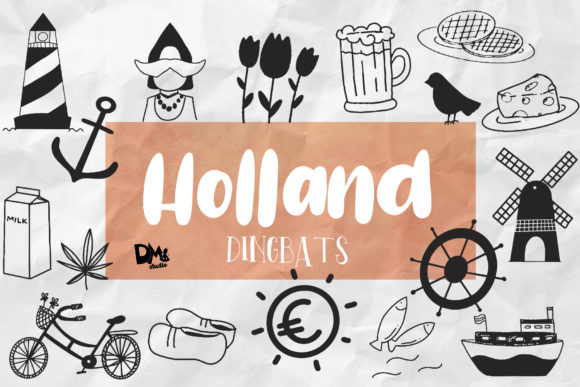
Imagine typing “heart” and seeing a clean, hand-drawn heart icon appear—not from a menu, not after hunting through an emoji picker, but instantly, as part of your text flow. Now imagine doing that for 36 distinct, expressive doodles: a lightbulb for ideas, a gear for systems, a leaf for sustainability, a rocket for growth—each triggered by a single keystroke from A–Z, a–z, or 0–9. That’s Holland Dingbats in action: a smart, lightweight font-based toolkit where symbols behave like letters.
What Holland Dingbats Actually Is (and What It Isn’t)
Holland Dingbats isn’t clip art. It’s not a plugin, a web app, or a subscription service. It’s a carefully crafted OpenType font file—downloadable, installable, and immediately usable in any application that supports custom fonts: Microsoft Word, Google Docs (via add-ons), Adobe Creative Cloud, Notion, Figma, Keynote, or even email clients like Outlook. Each character maps to a thoughtfully designed doodle—no extra clicks, no context switching, no loading spinners.
The collection includes exactly 36 glyphs: one for each letter A–Z (uppercase and lowercase share the same visual form, ensuring consistency), plus ten numerals 0–9. Unlike emoji fonts—which often vary wildly across platforms or lack typographic harmony—Holland Dingbats is built with deliberate line weight, spacing, and scale so it pairs naturally with body text. It ships with a companion sans-serif typeface designed to complement its friendly yet precise aesthetic—making it easy to build cohesive headers, slide decks, lesson plans, or social posts without wrestling with mismatched styles.
Why Typing Doodles Feels Like a Small Leap—But Enables Real Workflow Shifts
Today’s professionals juggle fragmented tools: icons pulled from libraries, illustrations inserted as PNGs, emojis pasted inconsistently, or vector assets dragged into layouts. Each step breaks flow, adds friction, and risks visual inconsistency. Holland Dingbats removes that friction—not by replacing illustration software, but by embedding expressive shorthand directly into the writing layer.
A teacher building a classroom handout can type “Q” and get a question mark doodle beside a quiz prompt—no copy-pasting, no resizing. A product manager drafting a sprint retrospective can type “R” for a refresh icon next to “Process Review,” then “E” for an eye beside “User Feedback.” A freelance designer annotating a wireframe in Figma can use “C” for a checklist doodle inline with notes—keeping commentary visual *and* editable as plain text.
This isn’t about replacing high-fidelity graphics. It’s about lowering the threshold for visual thinking—so small moments of clarity, emphasis, or warmth don’t get edited out for the sake of speed.
How Changing Habits Are Making Font-Based Doodles More Relevant
We’re spending more time typing—and less time designing from scratch. Remote collaboration favors lightweight, universally supported formats. Presenters avoid complex animations; educators need materials that render reliably on student Chromebooks; marketers build quick-turn social assets in Canva or Google Slides. In all these cases, compatibility matters more than novelty.
Holland Dingbats works where many alternatives don’t: it renders cleanly in PDF exports, prints crisply at any size, scales responsively in web CSS, and stays editable in collaborative docs. There’s no dependency on internet connection, third-party servers, or proprietary rendering engines. It’s as reliable as Times New Roman—but with personality.
This reliability aligns with a broader shift: professionals increasingly value tools that integrate quietly rather than demand attention. Think of how monospace fonts became standard for coding notes, or how bullet journal enthusiasts adopted simple, repeatable symbols to track habits. Holland Dingbats fits that same ethos—it’s functional first, delightful second.
Practical Uses Across Roles—No Design Degree Required
For educators: Use “S” for a star beside student achievements, “P” for a pencil when prompting written responses, or “B” for a book icon in reading logs. Because it’s a font, students can use it too—no special software needed, just font installation and basic typing skills.
For marketers and content creators: Build consistent branded visuals fast. Pair “L” (a lamp) with “Lightbulb Idea” in a newsletter header. Use “G” (a gift box) beside limited-time offers. Since the doodles are vector-based, they stay sharp on retina displays and mobile previews—unlike raster icons that blur when scaled.
For entrepreneurs and solopreneurs: Create polished pitch decks without hiring a designer. Insert “M” (a megaphone) next to “Market Reach,” or “T” (a target) beside “Target Audience.” The companion font ensures headings and doodles share optical balance—so your slides look intentional, not patched together.
For developers and technical writers: Annotate documentation with “C” (code brackets), “D” (database), or “N” (network cloud). Because it’s text-based, these symbols survive version control diffs, screen readers (with proper alt text added manually), and translation workflows—unlike embedded images that break or require separate localization.
Typography Matters—Especially When Symbols Stand In for Meaning
A doodle only works if it’s legible, recognizable, and harmonious with surrounding text. Holland Dingbats was designed with that in mind: each glyph has open counters, balanced negative space, and stroke weights calibrated to match its companion sans-serif. That means “O” (a circle with dot) doesn’t look heavier than “I” (a vertical line with crossbar)—a subtle but critical detail when mixing symbols and letters in the same line.
This attention to typographic integrity separates it from casual icon fonts that prioritize quantity over cohesion. You wouldn’t set body copy in Comic Sans and expect credibility—yet many teams drop inconsistent, low-contrast icons into professional documents daily. Holland Dingbats offers an alternative: expressive, but grounded.
Getting Started Is Literally One Keystroke Away
Installation takes under 30 seconds on macOS or Windows. Once installed, select Holland Dingbats in your font menu—and start typing. A gives you an anchor. F gives you a flame. 7 gives you a speech bubble. No tutorials, no toggles, no learning curve beyond knowing your keyboard layout.
Because it’s Unicode-mapped to standard alphanumeric positions, it works with keyboard shortcuts, auto-correct rules, and even voice-to-text input (if your OS supports font-specific dictation). And since it’s delivered as a static font file—not a cloud service—you retain full control over usage, licensing, and privacy.
Not a Trend, But a Thoughtful Response to Real Needs
Holland Dingbats didn’t emerge from a desire to chase “visual communication trends.” It grew from watching how people actually work: annotating PDFs with clunky stamp tools, pasting mismatched SVGs into presentations, or abandoning visual cues altogether because they slowed things down. Its value lies in restraint—in solving one narrow problem exceptionally well: making meaningful symbols as accessible as letters.
That focus makes it durable. It won’t be obsolete when AI generates custom illustrations on demand—because its strength is predictability, portability, and human-scale control. It’s not trying to do everything. It’s trying to do one thing—help you express more, type less—and do it in a way that feels native, not tacked on.
If your work involves explaining, teaching, pitching, documenting, or guiding others—and if you’ve ever paused mid-sentence to hunt for the right icon—you already know the gap Holland Dingbats fills. It won’t replace your design system. But it might become the quiet, reliable layer beneath it—the doodle you reach for before you reach for anything else.