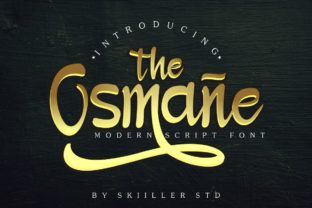
Osmane: A Modern Handwritten Font That Delivers Personality—Without the Pitfalls
Osmane isn’t just another script font—it’s a thoughtful evolution of classic handwriting aesthetics, refined for clarity, versatility, and expressive impact. With its graceful letterforms and rich swash alternatives, Osmane bridges authenticity and professionalism in ways many handwritten fonts fail to do. Whether you're designing a wedding invitation, a boutique brand identity, a social media graphic, or an educational handout, Osmane brings warmth and intentionality—if used with awareness.
What Makes Osmane Stand Out (and Why It’s Easy to Misuse)
At its core, Osmane is a variable-capable, OpenType-rich typeface built for real-world use—not just visual flair. Its standout features include contextual alternates, discretionary ligatures, and multiple swash options per character—especially on uppercase letters and select lowercase forms like g, y, and z. These aren’t decorative afterthoughts; they’re carefully engineered to flow naturally when activated through proper software support (like Adobe Illustrator, Photoshop, or modern web browsers with @font-feature-settings).
Yet many users treat Osmane like a “plug-and-play” script—typing normally and expecting magic. The result? Crowded lines, inconsistent rhythm, or unintended swashes that clash rather than complement. That’s not a flaw in Osmane—it’s a mismatch between expectation and execution.
Assuming All Swashes Work Everywhere
Swashes add elegance—but only when intentional. Using every available swash in a single headline often overwhelms the eye and weakens readability. For example, applying flamboyant entry and exit swashes to every letter in “Celebrate Love” may look busy instead of beautiful.
Better approach: Reserve swashes for strategic emphasis—start and end letters, key brand initials, or standalone words in logos. In body text or captions, stick to the default upright forms for consistency and legibility.
Overlooking Language & Character Support
Osmane includes extended Latin coverage (accents, diacritics, and common European language characters), but it doesn’t support Cyrillic, Arabic, or East Asian scripts. If your project targets multilingual audiences—or even includes French, Spanish, or Turkish phrases—you’ll need to verify glyph coverage before finalizing layouts.
Check this first: Open the font in a character map tool (like Font Book on macOS or Character Map on Windows) and search for essential accented characters you’ll actually use—é, ñ, ç, ü. Don’t assume—they’re included, but double-checking prevents last-minute font swaps or broken text in live designs.
Using Osmane at Small Sizes Without Adjustment
Like most expressive scripts, Osmane shines at 24pt and above. Below 16pt—especially in digital interfaces or printed fine print—the delicate terminals and thin strokes can blur or disappear entirely. This isn’t poor design; it’s physics meeting typography.
Solution: For subheadings or short labels under 18pt, test Osmane alongside a clean sans-serif companion (like Inter or Manrope) for hierarchy. Or use Osmane only for display elements (logos, banners, hero text), and switch to a highly legible secondary font for supporting content.
Downloading Unlicensed or Modified Versions
You might find “free Osmane” on unofficial font sites—but these are often outdated, stripped of OpenType features, or worse, bundled with malware. Worse, they lack licensing for commercial use—putting your client work, Shopify store, or newsletter at legal risk.
Do this instead: Purchase directly from the foundry (or trusted resellers like Creative Market or MyFonts). You’ll get the full feature set, updates, technical support, and a license that matches your use case—personal, freelance, or extended commercial.
How to Use Osmane Well—Even If You’re Just Starting Out
You don’t need advanced typography training to use Osmane effectively. Start simple and build confidence:
- Begin with one weight and one style. Osmane offers Light, Regular, and Bold weights—but mixing them freely without purpose can dilute cohesion. Try building a full mockup using only Regular first, then introduce Bold for contrast where needed.
- Enable OpenType features deliberately. In Adobe apps, open the Glyphs panel (Window > Type > Glyphs) and toggle swashes manually—or use the Character panel’s OpenType menu to activate “Contextual Alternates” and “Discretionary Ligatures.” This gives you control, not chaos.
- Pair thoughtfully—not automatically. Avoid pairing Osmane with other decorative fonts. Instead, choose neutral, well-spaced sans-serifs (like Poppins or Lato) or gentle serifs (like Cormorant Garamond) that let Osmane breathe. Contrast in form—not busyness—is what creates balance.
- Test across devices and outputs. A swash that looks stunning on your high-res monitor may vanish on a mobile screen or soften in offset printing. Print a physical proof or preview on multiple devices before final delivery.
Before You Buy or Deploy Osmane: Five Quick Checks
- Licensing scope: Does your plan cover web embedding, app usage, or merchandise? Read the EULA—not just the marketing copy.
- File format compatibility: Ensure you receive .OTF (OpenType) files—not just .TTF—for full access to swashes and alternates.
- Software readiness: Confirm your tools support OpenType features. Older versions of Canva or free design apps may not.
- Brand alignment: Does Osmane reflect the tone you want—approachable but polished? Playful but trustworthy? If your audience is financial advisors or healthcare providers, test how Osmane reads in context—not just in isolation.
- Support & updates: Reputable vendors offer updates and responsive help. If something feels off in your workflow, you’ll want a clear path to answers—not a dead-end forum post.
Osmane rewards attention. It’s not about adding more flourishes—it’s about choosing the right ones, at the right time, for the right reason. When you align its expressive potential with practical constraints—legibility, licensing, language, and layout—you unlock something rare: handwriting that feels both human and intentional. That’s not just design. It’s communication, elevated.