Rushink Duo: A Bold Brush + Elegant Script Font Pair Done Right
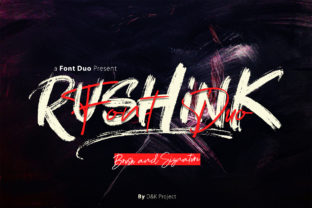
When you’re designing a logo, crafting social media graphics, or building a brand identity, font choice isn’t just about aesthetics—it’s about clarity, tone, and consistency. Rushink Duo stands out because it’s not a single font, but a thoughtfully balanced pair: a confident, textured brush typeface paired with a fluid, expressive script. That intentional duality makes it powerful—but only when used intentionally.
Why Designers Reach for Rushink Duo (and Why Some Miss the Point)
Many choose Rushink Duo expecting instant polish—especially for handcrafted brands, boutique packaging, or creative portfolios. Its brush font carries energy and authenticity; its script adds warmth and personality. Used well, it creates contrast that guides the eye, supports hierarchy, and reinforces voice. But here’s where things often go sideways: people treat it like two standalone fonts rather than a coordinated system.
A common misstep? Using both fonts at equal weight in the same headline—say, “RUSHINK” in the brush style and “Duo” in the script—without adjusting spacing, size, or alignment. The result isn’t harmony—it’s visual competition. The brush letters demand attention with their thick strokes and organic texture, while the script flows with delicate connections. Throwing them together without tuning leads to uneven rhythm, awkward line breaks, and unintentional imbalance.
1. Kerning Isn’t Optional—It’s Essential
The brush font in Rushink Duo has strong, variable stroke widths. That means default letter spacing rarely works across all character combinations. For example, “AV”, “To”, or “Wa” can look cramped or disjointed unless manually adjusted. Relying solely on auto-kerning (or worse—ignoring kerning entirely) flattens the font’s natural energy and makes text feel stiff or amateurish.
Better approach: Spend five minutes reviewing key word pairs in your design software. In Adobe Illustrator or Figma, use manual kerning controls—not tracking—to fine-tune spacing between high-contrast letter combinations. Even 5–10 units of adjustment can restore flow and intentionality.
2. Script Isn’t Just for Names—It Needs Context
Some assume the script component is only suitable for signatures, taglines, or decorative flourishes. While it shines there, limiting it to those uses underuses its potential. More importantly, applying it without considering background contrast or scale can backfire. Its thin strokes and subtle connections disappear on busy textures or at small sizes—even at 24pt on a mobile screen, legibility suffers if the script isn’t given enough breathing room or contrast.
Better approach: Reserve the script for short, high-impact phrases (e.g., “Hand-poured”, “Est. 2022”, “Made with care”) and always test it against your final background—especially photos, gradients, or patterned overlays. If it’s hard to read at arm’s length, simplify: increase size, add subtle stroke contrast, or switch to the brush font for improved clarity.
3. Licensing Confusion Leads to Real Risk
Rushink Duo is typically sold as a commercial license—but not all sellers offer the same permissions. Some marketplaces bundle it with “personal use only” licenses, while others include web font files or extended rights for merchandise. Assuming your purchase covers all your needs—like embedding in an email newsletter, using in a client’s Shopify store, or printing on product labels—can lead to compliance issues down the line.
Better approach: Before downloading or buying, check the license details directly from the original foundry or authorized distributor. Look for clear language around desktop, web, app, and print usage—and confirm whether you need separate licenses for client work. When in doubt, contact the creator or vendor. It’s faster than redesigning later.
What to Check Before You Commit
Before adding Rushink Duo to your project—or your font library—take a moment to assess three practical things:
- Your medium: Is this for digital screens, printed materials, or both? The brush font holds up beautifully in large-format print, but may require hinting or export adjustments for crisp web rendering.
- Your audience’s expectations: A wellness coach might resonate with the script’s softness, while a tech startup could find it mismatched with their messaging. Ask: does this pairing reflect the professionalism *and* personality your audience expects?
- Your workflow fit: Does your team have access to OpenType features like stylistic alternates or ligatures? Rushink Duo includes some—like swash capitals or connecting script variants—but they only activate if your software and settings support them. Don’t assume they’ll appear automatically.
Realistic Examples: From Misstep to Improvement
Consider a small bakery launching Instagram posts. Early designs used the script font for “Freshly Baked” and the brush font for “Croissants” stacked directly underneath—same size, no leading adjustment. The script felt fragile next to the bold brush, and the tight vertical spacing made both lines compete instead of complement.
The fix wasn’t switching fonts—it was refining execution: increasing the script size by 15%, adding 20% more line height, and slightly tracking out the brush text to match visual weight. Suddenly, “Freshly Baked” felt inviting, and “Croissants” carried presence—no extra effort, just mindful spacing.
Or take a freelance designer preparing a brand guide for a new client. They included Rushink Duo as the primary display typeface but didn’t specify fallbacks for body copy. When the client tried using it for paragraphs, readability collapsed. The solution? Clarifying early that Rushink Duo is a display pair, not a text family—and recommending clean, neutral sans-serifs (like Inter or Manrope) for supporting content.
Final Thought: Respect the Duo, Not Just the Fonts
Rushink Duo works best when treated as a unified design tool—not two fonts you happen to own. Its strength lies in contrast done with care: weight versus flow, structure versus movement, boldness versus grace. That balance doesn’t happen by accident. It happens when you pause to kern, test, license correctly, and align usage with real-world context.
You don’t need more fonts. You need better awareness of how the ones you already love—like Rushink Duo—respond to your choices. Start small: adjust spacing in one headline today. Test the script on your actual background. Read the license before you paste it into a client file. Those quiet, practical steps are where good typography becomes trusted typography.