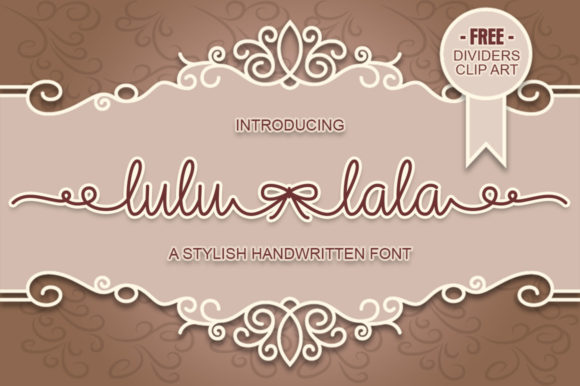
Lulu-Lala: A Handwritten Font That Fits Real Workflows
Lulu-Lala isn’t just another decorative script—it’s a functional handwritten font designed with intention. Its soft, rounded letterforms and subtle irregularities evoke warmth and authenticity without sacrificing legibility. Unlike many playful fonts that blur into background noise, Lulu-Lala maintains clarity at small sizes and holds visual weight in larger applications. It bridges the gap between personality and practicality, making it especially valuable for professionals who need to communicate with both heart and precision.
Where Lulu-Lala Fits in Your Creative and Operational Flow
Fonts don’t exist in isolation—they’re part of a sequence: planning, drafting, refining, sharing, and iterating. Lulu-Lala enters most naturally during the refining and sharing phases, where tone, voice, and emotional resonance matter as much as information delivery. Think of it as the final brushstroke—not the sketch, not the outline, but the detail that signals care and intentionality.
For educators designing classroom handouts or digital learning modules, Lulu-Lala adds approachability to instructions or reflection prompts—softening formal language without undermining authority. Bloggers use it for pull quotes or section headers to guide readers’ eyes and reinforce key takeaways. Small business owners apply it sparingly on packaging inserts, thank-you cards, or limited-edition product labels where human connection directly impacts perceived value.
Using Lulu-Lala Before, During, and After Key Tasks
Before a project: When preparing client presentations or pitch decks, previewing Lulu-Lala in your mockups helps surface whether your messaging feels aligned with your brand’s emotional goals. If your strategy centers on trust and warmth—say, for a wellness coaching service or an early-childhood education platform—Lulu-Lala acts as a litmus test. If it feels “off” in early wireframes, that’s useful feedback about mismatched voice and audience expectations.
During execution: Designers integrate Lulu-Lala into style guides with clear usage rules—not as a default body font, but as a deliberate accent. For example, pairing it with a clean sans-serif like Inter or Open Sans creates contrast that supports hierarchy: headings in Lulu-Lala, body copy in the neutral typeface. This pairing works across platforms—Figma, Adobe Illustrator, Canva—and scales reliably from social graphics to printed workshop materials.
After launch: When gathering user feedback or analyzing engagement metrics, notice how audiences respond to touchpoints using Lulu-Lala. Does an email subject line in Lulu-Lala yield higher open rates among long-time subscribers? Do printed resource kits with Lulu-Lala headers generate more follow-up questions? These aren’t vanity metrics—they reveal whether your typographic choice is reinforcing, rather than distracting from, your core message.
Compatibility and Practical Integration
Lulu-Lala ships in standard OTF and TTF formats, ensuring broad compatibility across operating systems and design tools. It includes full Latin character sets, basic punctuation, and ligatures that activate automatically in supporting software (like Adobe apps with OpenType features enabled). No plugins or workarounds are needed—just install and use.
For web use, convert Lulu-Lala to WOFF2 via a trusted font-hosting service or self-host with proper licensing. Always declare fallback fonts in CSS: font-family: "Lulu-Lala", cursive; ensures graceful degradation if the font fails to load. Avoid overloading pages with multiple weights—Lulu-Lala currently offers one well-balanced weight, which simplifies implementation and improves performance.
Print workflows benefit from Lulu-Lala’s generous x-height and open counters. At 14–16pt, it remains highly legible in multi-page PDFs—ideal for workbooks, guided journals, or facilitator guides. Just confirm your printer’s RIP (raster image processor) supports embedded OpenType features if you’re using ligatures in high-volume print runs.
Workflow Examples Across Roles
- Freelance marketers: Use Lulu-Lala for annotated client briefs—hand-drawn arrows and margin notes feel personal and collaborative, helping clients visualize revisions before formal design begins.
- Educators: Embed Lulu-Lala in Google Slides templates for student-facing “exit ticket” slides. The font subtly cues reflection and low-stakes participation—students associate its look with safe, expressive thinking.
- Small business owners: Apply Lulu-Lala to ingredient lists on artisan food labels. Its organic rhythm mirrors hand-written batch notes, reinforcing craft and transparency without requiring additional copy.
- Content creators: Layer Lulu-Lala text over video thumbnails in Premiere Pro or CapCut—not as the main title, but as a short phrase (“What’s inside?” or “Try this first”). It draws attention without competing with faces or key visuals.
Quality Control and Long-Term Usability
Because Lulu-Lala leans into handmade charm, consistency matters. Avoid stretching, skewing, or applying heavy effects (like drop shadows or excessive tracking), which dilute its natural rhythm. Stick to its intended scale range: 18–36pt for headlines, 14–16pt for callouts, and never below 12pt in print or 14pt on screen.
Test readability across devices. On mobile, ensure line spacing remains generous—Lulu-Lala benefits from extra breathing room. In dark mode interfaces, use slightly increased letter-spacing and avoid pure black text on dark backgrounds; a soft charcoal (#333333) preserves contrast while honoring the font’s gentle nature.
Long-term, treat Lulu-Lala as a signature element—not a trend. Rotate it thoughtfully across projects so it becomes associated with your voice, not just a seasonal aesthetic. If you use it in your newsletter banner, also apply it to your workshop certificates or slide deck footers. Repetition builds recognition; restraint preserves impact.
Getting Started Without Overcomplicating Things
You don’t need a full rebrand to begin. Start with one repeatable, low-risk application: the “thank you” line in your email signature, the subtitle on your Notion dashboard header, or the label on your physical notebook spine. Observe how it feels to write or design with it—not just how it looks. Does it slow you down in a helpful way? Does it make routine tasks feel more intentional?
Then expand deliberately. Keep a Lulu-Lala “usage log”—a simple table noting date, context, tool used, and one observation (e.g., “Used in Canva social post—client commented on ‘friendly tone’”). Patterns will emerge: maybe it works best for internal team comms, or only in combination with specific colors, or exclusively in analog contexts like whiteboard sketches.
That kind of grounded observation—not theoretical best practices—is what turns a font into a functional part of your process. Lulu-Lala earns its place not by being everywhere, but by being *right* where it lands.
Final Thought: Tools Serve Process, Not the Other Way Around
Lulu-Lala succeeds because it doesn’t ask you to change how you work—it adapts to how you already think, teach, sell, create, or connect. It respects your time by loading quickly, rendering consistently, and communicating clearly—even when used quietly. Whether you’re mapping a curriculum, drafting a grant proposal, prototyping a new app flow, or handwriting notes before a difficult conversation, Lulu-Lala offers a quiet, consistent note of humanity. And in workflows increasingly shaped by automation and speed, that quiet note often carries the most weight.