Malisa: A Light Handwritten Font That Fits Seamlessly Into Real Creative Workflows
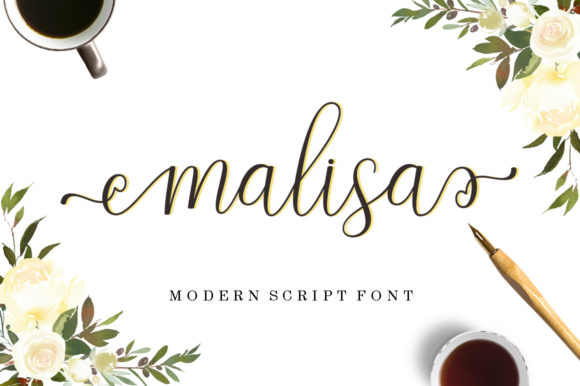
Malisa is a stunning, light handwritten font with graceful curves, subtle contrast, and an organic rhythm that feels both intentional and effortless. It’s not just decorative—it’s functional. Designed with clarity and warmth in mind, Malisa bridges the gap between personality and professionalism. Whether you're crafting a brand identity, preparing a workshop handout, designing a newsletter, or refining a pitch deck, Malisa adds human texture without sacrificing legibility or polish.
Where Malisa Fits in Your Design Process
Fonts aren’t used in isolation—they’re part of a sequence: research, sketching, structuring, drafting, refining, and delivering. Malisa excels at specific moments in that flow—particularly where tone, trust, and approachability matter most. It’s rarely the first font you choose for wireframing or system UI work, but it shines early in mood board development, client presentations, or concept refinement. Its light weight and natural stroke variation make it ideal for setting emotional context before committing to heavier visual systems.
Think of Malisa as a “tone-setting layer.” You might use it in a brand strategy document to illustrate how voice translates into visual form—or in a slide deck to label key values (“Clarity,” “Care,” “Curiosity”) where serif or sans-serif fonts would feel too formal or detached. Because it’s light—not thin, not fragile—it holds up well at medium sizes (16–24px) on screen and in print, especially against soft or neutral backgrounds.
Using Malisa Before a Project Begins
Before launching into execution, many creators spend time aligning on intent: What feeling should this evoke? Who is the audience? What’s the core message—not just the words, but the subtext? Malisa supports that alignment phase. When building a creative brief or internal kickoff deck, using Malisa for headings or pull quotes helps stakeholders quickly grasp the desired emotional register. It signals warmth, authenticity, and intentionality—without requiring explanation.
For educators and trainers, Malisa works well in pre-workshop materials: welcome emails, learning path overviews, or reflection prompts. Its handwritten quality lowers perceived formality, encouraging engagement before the session even starts. Small business owners often use it in early-stage brand mood boards shared with designers or copywriters—giving collaborators immediate visual cues about voice and pacing.
During Execution: Practical Integration Tips
Malisa isn’t meant to carry long paragraphs or dense interfaces—but it performs exceptionally well in targeted applications:
- Headlines and subheads—especially in editorial layouts, landing pages, or social media graphics where hierarchy needs gentle distinction.
- Caption text and callouts—its open letterforms improve readability in tight spaces like Instagram carousels or email footers.
- Hand-drawn-style illustrations—when paired with vector sketches or watercolor textures, Malisa reinforces cohesion without competing visually.
- Branded stationery—letterhead, thank-you cards, or packaging inserts where personal touch matters more than scalability.
Compatibility is straightforward: Malisa includes standard Latin characters, basic punctuation, and OpenType features like ligatures and alternate glyphs. It works natively in Figma, Adobe Creative Cloud, and modern web environments via variable font files or WOFF2 embedding. For developers integrating it into websites, pairing it with a clean, highly legible sans-serif (like Inter, Lato, or even system fonts) creates balanced contrast—Malisa for voice, the companion font for function.
Avoiding Common Pitfalls
Because Malisa is light and expressive, it’s easy to overuse—or misapply. Resist placing it over busy backgrounds, in small body text (<14px), or alongside other highly stylized fonts. It also doesn’t scale well in all-caps settings; its charm lives in lowercase rhythm and word-level flow. Test spacing carefully: generous letter-spacing (50–100 units in design tools) often improves legibility without sacrificing elegance.
Also consider context: Malisa may feel out of place in technical documentation, financial reports, or enterprise dashboards—where neutrality and speed of parsing take priority. That’s not a limitation; it’s a signal. Use it where humanity is part of the deliverable, not where it competes with clarity.
After Delivery: Consistency and Long-Term Use
Once a project ships, consistency becomes critical—not just for aesthetics, but for recognition and trust. If Malisa anchors your brand’s expressive voice, document its usage clearly: specify size ranges, color contrast ratios (aim for at least 4.5:1 against background), and prohibited pairings. Include examples of correct and incorrect application in your brand guidelines—not as rigid rules, but as practical guardrails based on real testing.
Long-term usability depends on accessibility and adaptability. Malisa passes WCAG AA contrast standards when used with appropriate background colors and sizing. But remember: accessibility isn’t just compliance—it’s about ensuring your message lands with equal weight across devices, contexts, and abilities. Always preview how Malisa renders on mobile screens, in email clients, and with system font fallbacks enabled.
Workflow Examples Across Roles
Freelancers and agencies often use Malisa in proposal decks—not for body copy, but for section dividers (“Your Goals,” “Our Approach,” “Next Steps”). This subtly reinforces collaboration over transaction. The font becomes part of the service promise: thoughtful, human-centered, precise.
Educators and course creators integrate Malisa into downloadable worksheets, reflection journals, or module titles. Its lightness reduces cognitive load during learning—students focus on content, not stylistic heaviness. One university writing instructor uses it exclusively for feedback comments in Google Docs, finding students respond more openly to suggestions framed in Malisa than in default fonts.
Small business owners apply Malisa selectively: on product labels for handmade goods, in seasonal email headers, or as part of a limited-edition packaging series. It signals care in curation—not mass production. Crucially, they keep usage consistent across touchpoints: same weight, same sizing, same spacing. That repetition builds familiarity faster than flashy redesigns ever could.
Preparing to Use Malisa Well
Preparation isn’t about downloading and going—it’s about intention. Before adding Malisa to a file, ask:
- What emotion or relationship am I trying to reinforce here?
- Is this the best place for expressive typography—or would clarity benefit more from restraint?
- How will this look at the smallest intended size, and on the most common device my audience uses?
- Does this support, rather than compete with, the content’s purpose?
These questions take seconds—but they prevent rework, misalignment, and diluted impact. Malisa rewards thoughtful placement. It doesn’t demand attention; it invites connection. That makes it unusually effective in workflows where persuasion, empathy, and nuance matter more than volume or velocity.
Ultimately, Malisa fits naturally into process-oriented work because it respects process itself: it doesn’t rush, it doesn’t shout, and it doesn’t obscure. It waits for the right moment—and when used deliberately, it helps your work land with quiet confidence.