Double Vision: A Friendly Handwritten Font
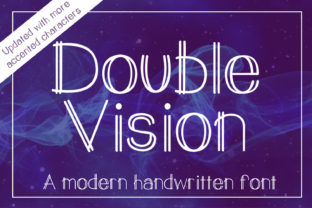
Double Vision is a modern handwritten font that feels personal, approachable, and thoughtfully crafted. Unlike rigid or overly stylized scripts, it balances natural flow with clean readability—making it ideal for creators who want warmth without sacrificing clarity. It includes the full Latin alphabet (both uppercase and lowercase), numerals 0–9, common punctuation, and accented characters—so it works across English, Spanish, French, Portuguese, and other widely spoken languages using those diacritics.
What Makes Double Vision Stand Out?
At its core, Double Vision captures the charm of real handwriting—but with consistent spacing, balanced weight, and thoughtful kerning. Each letter has subtle variation in stroke thickness and rhythm, just like someone writing with a fine-tip marker or soft brush pen. Yet it avoids the unpredictability that can make some script fonts hard to read at smaller sizes or on screens.
You’ll notice gentle entry and exit strokes, rounded terminals, and open counters—details that boost legibility while keeping the human touch intact. Because it supports accented characters and numbers, you can use it confidently in bilingual blog headers, product labels, social media graphics, or even classroom handouts without switching fonts mid-sentence.
Where Does Double Vision Fit In Real Life?
Think about the last time you saw a small-batch coffee bag with hand-lettered text—or a cozy Instagram story announcing a weekend workshop. That’s where Double Vision shines: in moments where authenticity matters more than perfection.
A freelance designer might use it for a client’s logo lockup when the brand values craft, care, and connection. A teacher could apply it to printable flashcards or classroom posters to add visual friendliness without distracting from learning goals. An entrepreneur launching an Etsy shop for handmade ceramics might choose Double Vision for their website banner—it signals artistry and intention, not automation.
It also works beautifully in digital spaces: email headers, Canva presentations, Notion page titles, or even custom Google Slides themes. Since it renders well on both retina and standard displays, it holds up whether someone’s viewing your newsletter on a phone or printing your event flyer at home.
Simple Projects That Feel Special With Double Vision
- Personal branding: Use it sparingly—for your name on a business card or signature line—to add distinction without overwhelming your overall design.
- Social content: Try it for quote graphics, announcement banners, or “behind-the-scenes” captions where tone and personality matter most.
- Educational tools: Create engaging worksheets or reading prompts where softer letterforms help reduce visual fatigue for younger learners or neurodiverse students.
- Small business signage: Pair it with a clean sans-serif (like Inter or Lato) for contrast—e.g., “Opening Soon” in Double Vision over “Spring Street Bakery” in a neutral typeface.
Things to Keep in Mind Before You Use It
Like any handwritten font, Double Vision works best when used intentionally—not everywhere at once. It’s not meant to replace body text in long articles or dense reports. Its strength lies in short, meaningful bursts: headlines, callouts, invitations, labels, and accents.
Also consider context. While it reads clearly at 24pt and above, avoid using it below 16pt in digital interfaces unless testing shows good legibility on your target devices. And if your project requires extended multilingual support—like Cyrillic or Arabic scripts—Double Vision won’t cover those; it’s built specifically for Latin-based languages.
Another practical note: licensing. Double Vision is typically available under desktop, web, and app licenses—so check what usage rights come with your purchase or download. If you’re building a client website or selling digital templates, make sure the license allows commercial use and redistribution where needed.
Pairing Double Vision Thoughtfully
Because it carries strong character, Double Vision pairs best with typefaces that offer contrast—not competition. A geometric sans-serif (like Montserrat or Poppins) gives structure and balance. A warm serif (such as Merriweather or Cormorant Garamond) adds elegance without clashing. Avoid pairing it with other script or display fonts unless you have clear hierarchy and breathing room between them.
In layout, give Double Vision space to breathe. Add generous line height, generous side margins, and minimal surrounding decoration. Let the handwriting quality speak for itself—don’t bury it under shadows, heavy borders, or competing textures.
Why People Choose Double Vision Today
More than aesthetics, people choose Double Vision because it helps communicate values: sincerity, creativity, attention to detail, and humanity. In a world saturated with AI-generated visuals and ultra-polished templates, this font quietly says, “A real person made this—and they cared how it felt to read.”
That resonance matters—whether you're drafting a heartfelt newsletter to your community, designing packaging for your homemade granola, or preparing slides for a student-led science fair. It doesn’t shout. It invites. And that makes it unusually versatile across age groups, industries, and skill levels.
Beginners appreciate how easy it is to install and use in everyday tools like Word, Keynote, or Figma. Seasoned designers value its completeness and typographic integrity. Educators find it accessible for students learning letter formation. Marketers notice how it lifts engagement in low-friction touchpoints—like opt-in forms or thank-you pages—without requiring extra explanation.
Most importantly, Double Vision doesn’t ask you to be a typography expert to benefit from it. You don’t need to adjust tracking manually or learn OpenType features to get great results. Install it, type something, and feel the difference right away.