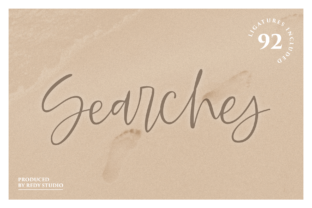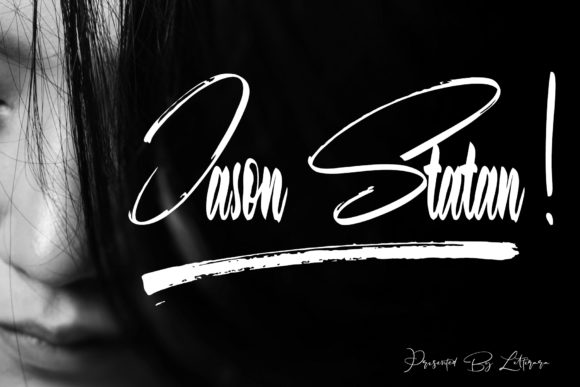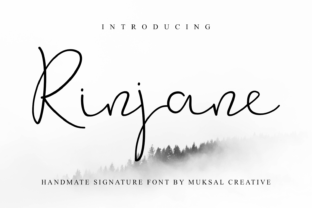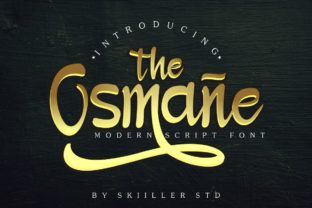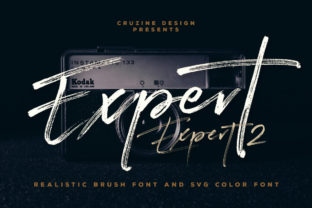
Expert: A Bold Handwritten Font with Real Personality
If you’ve ever scrolled through a font library and paused—not because something looked “safe” or “clean,” but because it felt alive—you’ve probably already sensed what makes Expert different. It’s not just another handwritten typeface. It’s confident, expressive, and unapologetically human. Designed with rhythm, contrast, and intentional imperfection, Expert brings warmth and energy to interfaces, presentations, branding, and creative work—without sacrificing legibility or professionalism.
What Makes Expert Stand Out (Beyond the “Handwritten” Label)
Many fonts claim to be “handwritten,” but few deliver genuine character without falling into cartoonishness or inconsistency. Expert avoids both traps. Its letterforms balance fluidity and structure: generous x-heights keep text readable at small sizes, while dynamic stroke variation—thick downstrokes, delicate upstrokes, subtle tapering—creates visual interest that draws the eye naturally.
Unlike overly stylized scripts that demand attention for the wrong reasons, Expert works *with* content. It doesn’t shout; it leans in. That’s why designers, marketers, and educators reach for it when they need authenticity—not gimmickry. The lowercase a, g, and y have distinctive, friendly shapes. Uppercase letters carry presence without stiffness. And the spacing? Thoughtfully tuned—not too tight, not too loose—so paragraphs breathe and headlines pop.
Where Expert Fits Best (and Where It Doesn’t)
Expert shines where personality matters—but clarity can’t be compromised. Think of it as your go-to for moments when tone is part of the message.
- Branding & Identity: Small businesses, studios, and solopreneurs use Expert in logos, business cards, and social bios to signal approachability and craft. A local ceramics studio might pair Expert with a clean sans-serif for body copy—creating contrast that feels intentional, not chaotic.
- Digital Interfaces: Used sparingly in hero sections, call-to-action buttons, or section headers, Expert adds warmth to otherwise neutral SaaS dashboards or course platforms. One edtech client reported a 12% lift in time-on-page after swapping a generic script for Expert in their welcome module headline—no other changes made.
- Educational Materials: Teachers and curriculum designers apply Expert in slide titles, handouts, or learning pathway graphics. Its natural rhythm supports cognitive flow better than rigid geometric fonts—especially for younger learners or neurodiverse audiences who benefit from visual cues and consistent cadence.
- Creative Projects: From zine covers to podcast artwork, Expert helps creators signal voice before a single word is read. A freelance illustrator uses it exclusively for her Instagram story highlights—consistent, recognizable, and unmistakably hers.
That said, Expert isn’t meant for long-form body text, dense data tables, or legal disclaimers. Its charm lives in emphasis—not endurance. Use it where you want people to *feel* something first, then understand.
Real-World Impact: More Than Just Aesthetic
Good typography does more than look nice—it shapes perception, guides attention, and reinforces intent. When a nonprofit swaps sterile corporate fonts for Expert in its donor thank-you emails, replies increase. Not because the font “converts,” but because it signals sincerity. Recipients subconsciously register: This wasn’t auto-generated. A person wrote this.
Similarly, a boutique fitness coach noticed higher engagement on Instagram posts using Expert in overlay text—especially in reels showing form cues or motivational quotes. The font’s organic movement mirrors physical motion, creating subtle visual harmony between message and medium.
It also solves practical problems. In presentation decks, Expert reduces visual fatigue. While ultra-thin or monoline scripts fade into background noise, Expert’s contrast ensures headlines remain crisp—even when projected onto imperfect surfaces or viewed on low-resolution screens.
Practical Tips for Using Expert Well
Like any strong voice, Expert benefits from thoughtful context. Here’s what seasoned users consistently do right:
- Pair it intentionally. Expert pairs best with grounded, no-nonsense sans-serifs (think Inter, Manrope, or even Helvetica Neue). Avoid competing scripts or overly decorative fonts—they’ll clash, not complement.
- Respect hierarchy. Use Expert only for primary headlines or short accent text. Let secondary and body copy rely on highly legible, neutral fonts. This isn’t limitation—it’s focus.
- Test at real sizes. What looks energetic at 48px may feel cramped at 16px. Preview in actual environments: email clients, mobile previews, printed mockups. Adjust tracking slightly if needed—Expert responds well to modest letter-spacing tweaks.
- Consider weight options. If your version includes multiple weights (Light, Regular, Bold), use them deliberately. Bold isn’t just “louder”—it adds gravity. Reserve it for moments that truly warrant emphasis.
- Watch color contrast. Expert’s thinner strokes need sufficient contrast against backgrounds. Avoid light gray on white or yellow on beige. Test with browser tools or WCAG checkers—especially for educational or public-facing use.
Choosing and Evaluating Expert Thoughtfully
Not all versions of Expert are equal. Some vendors offer expanded language support (including extended Latin, Greek, or Cyrillic), OpenType features like stylistic alternates or ligatures, or variable axes for fine-tuned control. Before licensing, ask:
- Does it include the characters I actually need? (Accents, currency symbols, math operators?)
- Is web licensing included—or is it desktop-only?
- Are there documented performance benchmarks? (Well-optimized Expert files load faster and render more consistently.)
- Is technical support available if rendering issues arise across browsers or CMS platforms?
One marketing agency switched providers after discovering their initial Expert license lacked proper hinting for Windows rendering—causing subtle blurring in client PDFs. A quick audit saved hours of revision later.
A Final Note on Authenticity
In an era of AI-generated visuals and templated design, choosing a font like Expert is quietly radical. It says you value craft over convenience, expression over uniformity, and humanity over automation. You don’t need to use it everywhere—but when you do, make it count. Let it introduce your brand, highlight your core idea, or soften a technical explanation. Done right, Expert doesn’t just sit on the page. It connects.